Extract features from CSLs
After creating and annotating CSLs, features can be extracted from each cell to quantitatively compare molecular intensity differences and spatial re-localisation of proteins in different conditions. CAMPA can extract the following features:
Intensity: per-cluster mean and size features. Needs to be calculated first to set up the adata.
Co-occurrence: spatial co-occurrence between pairs of clusters at different distances.
Object stats: number and area of connected components per cluster
The features are saved as an AnnData object and can be used to compare molecular abundance within CSLs and spatial co-occurrence of CSLs in different conditions (e.g. perturbations).
Please make sure that you clustered the data and projected the result to the entire example dataset as described in the Cluster data into CSLs tutorial before running this tutorial.
[1]:
from pathlib import Path
import os

from IPython.display import display
import pandas as pd
import anndata as ad

from campa.pl import (
    plot_mean_size,
    plot_object_stats,
    plot_co_occurrence,
    plot_mean_intensity,
    get_intensity_change,
    plot_intensity_change,
    plot_co_occurrence_grid,
)
from campa.tl import Experiment, extract_features, FeatureExtractor
from campa.utils import load_config, init_logging, merged_config
from campa.constants import campa_config

# init logging with level INFO=20, WARNING=30
init_logging(level=30)
# read correct campa_config -- created with setup.ipynb
CAMPA_DIR = Path.cwd()
campa_config.config_fname = CAMPA_DIR / "params/campa.ini"
print(campa_config)
2022-11-25 14:34:34.778284: I tensorflow/core/platform/cpu_feature_guard.cc:193] This TensorFlow binary is optimized with oneAPI Deep Neural Network Library (oneDNN) to use the following CPU instructions in performance-critical operations:  AVX2 AVX512F AVX512_VNNI FMA
To enable them in other operations, rebuild TensorFlow with the appropriate compiler flags.
2022-11-25 14:34:52.031324: I tensorflow/core/util/util.cc:169] oneDNN custom operations are on. You may see slightly different numerical results due to floating-point round-off errors from different computation orders. To turn them off, set the environment variable `TF_ENABLE_ONEDNN_OPTS=0`.
2022-11-25 14:34:55.054866: E tensorflow/stream_executor/cuda/cuda_blas.cc:2981] Unable to register cuBLAS factory: Attempting to register factory for plugin cuBLAS when one has already been registered
Reading config from /home/icb/hannah.spitzer/projects/pelkmans/software_new/campa_notebooks_test/params/campa.ini
CAMPAConfig (fname: /home/icb/hannah.spitzer/projects/pelkmans/software_new/campa_notebooks_test/params/campa.ini)
EXPERIMENT_DIR: /home/icb/hannah.spitzer/projects/pelkmans/software_new/campa_notebooks_test/example_experiments
BASE_DATA_DIR: /home/icb/hannah.spitzer/projects/pelkmans/software_new/campa_notebooks_test/example_data
CO_OCC_CHUNK_SIZE: 10000000.0
data_config/exampledata: /home/icb/hannah.spitzer/projects/pelkmans/software_new/campa_notebooks_test/params/ExampleData_constants.py
Extract features
To extract features, the high-level API function extract_features is used.
Extracting co-occurrence scores can take a long time, and it is recommended to use the CLI to run the feature extraction in a script:
cd CAMPA_DIR/params
campa extract_features example_feature_params.py
To define which features should be extracted, a parameter dictionary is used. All parameters that can be set in this dictionary are documented with the extract_features function. Here, we are going to use an example feature params file that extracts intensity, co-occurrence, and object features (object size, circularity, etc.) from the
test_pre_trained/CondVAE_pert-CC experiment we clustered in the clustering tutorial.
[2]:
# load parameter dictionary
params = load_config("params/example_feature_params.py")
# just use the first variable_params configuration here
for variable_params in params.variable_feature_params[:1]:
    cur_params = merged_config(params.feature_params, variable_params)
print(cur_params)
{'experiment_dir': 'test_pre_trained/CondVAE_pert-CC', 'cluster_name': 'clustering_res0.2', 'cluster_dir': 'aggregated/sub-pre', 'cluster_col': 'annotation', 'data_dirs': ['184A1_unperturbed/I09', '184A1_unperturbed/I11', '184A1_meayamycin/I12', '184A1_meayamycin/I20'], 'save_name': 'features_annotation.h5ad', 'force': False, 'features': ['intensity', 'co-occurrence', 'object-stats'], 'co_occurrence_params': {'min': 2.0, 'max': 60.0, 'nsteps': 5, 'logspace': True, 'num_processes': None}, 'object_stats_params': {'features': ['area', 'circularity', 'elongation', 'extent'], 'channels': []}}
Using these parameters, we can now extract the features. The extracted features will be saved to cur_params['save_name'] in each data directory in experiment_dir/aggregated/full_data.
Note that this step will take ~10 minutes to complete. For a faster result, you can turn off the computation of the co-occurrence features by setting cur_params['features'] = ['intensity', 'object-stats']
[3]:
extract_features(cur_params)
Cannot read with memmap:  /home/icb/hannah.spitzer/projects/pelkmans/software_new/campa_notebooks_test/example_experiments/test_pre_trained/CondVAE_pert-CC/aggregated/full_data/184A1_unperturbed/I09/clustering_res0.2.npy
Cannot read with memmap:  /home/icb/hannah.spitzer/projects/pelkmans/software_new/campa_notebooks_test/example_experiments/test_pre_trained/CondVAE_pert-CC/aggregated/full_data/184A1_unperturbed/I11/clustering_res0.2.npy
Cannot read with memmap:  /home/icb/hannah.spitzer/projects/pelkmans/software_new/campa_notebooks_test/example_experiments/test_pre_trained/CondVAE_pert-CC/aggregated/full_data/184A1_meayamycin/I12/clustering_res0.2.npy
Cannot read with memmap:  /home/icb/hannah.spitzer/projects/pelkmans/software_new/campa_notebooks_test/example_experiments/test_pre_trained/CondVAE_pert-CC/aggregated/full_data/184A1_meayamycin/I20/clustering_res0.2.npy
Explore and plot extracted features
Features are stored in AnnData objects with obs=cells and vars=channels. Intensity information is stored as layers, co-occurrence scores as obsm matrices (obs x distances for each cluster-cluster pair), and object features as matrices in uns.
The FeatureExtractor class loads this AnnData object and provides convenience functions to access feature information.
[4]:
# load features for each data_dir
exp = Experiment.from_dir("test_pre_trained/CondVAE_pert-CC")
extrs = [
    FeatureExtractor.from_adata(
        os.path.join(exp.full_path, "aggregated/full_data", data_dir, "features_annotation.h5ad")
    )
    for data_dir in exp.data_params["data_dirs"]
]

extrs[0].adata
[4]:
AnnData object with n_obs × n_vars = 12 × 34
    obs: 'mapobject_id', 'plate_name', 'well_name', 'well_pos_y', 'well_pos_x', 'tpoint', 'zplane', 'label', 'is_border', 'mapobject_id_cell', 'plate_name_cell', 'well_name_cell', 'well_pos_y_cell', 'well_pos_x_cell', 'tpoint_cell', 'zplane_cell', 'label_cell', 'is_border_cell', 'is_mitotic', 'is_mitotic_labels', 'is_polynuclei_HeLa', 'is_polynuclei_HeLa_labels', 'is_polynuclei_184A1', 'is_polynuclei_184A1_labels', 'is_SBF2_Sphase_labels', 'is_SBF2_Sphase', 'Heatmap-48', 'cell_cycle', 'description', 'dimensions', 'id', 'cell_type', 'EU', 'duration', 'perturbation', 'secondary_only', 'siRNA', 'perturbation_duration', 'LocalDensity_Nuclei_800', 'TR_factor', 'TR_norm', 'TR', 'TR_factor_DMSO-unperturbed', 'TR_norm_DMSO-unperturbed', 'obj_id_int'
    uns: 'clusters', 'co_occurrence_params', 'object_stats', 'object_stats_params', 'params'
    obsm: 'co_occurrence_Nuclear speckles_Nuclear speckles', 'co_occurrence_Nuclear speckles_Nucleolus', 'co_occurrence_Nuclear speckles_Nucleoplasm', 'co_occurrence_Nuclear speckles_PML bodies', 'co_occurrence_Nucleolus_Nuclear speckles', 'co_occurrence_Nucleolus_Nucleolus', 'co_occurrence_Nucleolus_Nucleoplasm', 'co_occurrence_Nucleolus_PML bodies', 'co_occurrence_Nucleoplasm_Nuclear speckles', 'co_occurrence_Nucleoplasm_Nucleolus', 'co_occurrence_Nucleoplasm_Nucleoplasm', 'co_occurrence_Nucleoplasm_PML bodies', 'co_occurrence_PML bodies_Nuclear speckles', 'co_occurrence_PML bodies_Nucleolus', 'co_occurrence_PML bodies_Nucleoplasm', 'co_occurrence_PML bodies_PML bodies', 'size'
    layers: 'intensity_Nuclear speckles', 'intensity_Nucleolus', 'intensity_Nucleoplasm', 'intensity_PML bodies'
The AnnData object contains all feature information
[5]:
extr = extrs[0]
print("AnnData read from", extr.fname)
print(extr.adata)
AnnData read from /home/icb/hannah.spitzer/projects/pelkmans/software_new/campa_notebooks_test/example_experiments/test_pre_trained/CondVAE_pert-CC/aggregated/full_data/184A1_unperturbed/I09/features_annotation.h5ad
AnnData object with n_obs × n_vars = 12 × 34
    obs: 'mapobject_id', 'plate_name', 'well_name', 'well_pos_y', 'well_pos_x', 'tpoint', 'zplane', 'label', 'is_border', 'mapobject_id_cell', 'plate_name_cell', 'well_name_cell', 'well_pos_y_cell', 'well_pos_x_cell', 'tpoint_cell', 'zplane_cell', 'label_cell', 'is_border_cell', 'is_mitotic', 'is_mitotic_labels', 'is_polynuclei_HeLa', 'is_polynuclei_HeLa_labels', 'is_polynuclei_184A1', 'is_polynuclei_184A1_labels', 'is_SBF2_Sphase_labels', 'is_SBF2_Sphase', 'Heatmap-48', 'cell_cycle', 'description', 'dimensions', 'id', 'cell_type', 'EU', 'duration', 'perturbation', 'secondary_only', 'siRNA', 'perturbation_duration', 'LocalDensity_Nuclei_800', 'TR_factor', 'TR_norm', 'TR', 'TR_factor_DMSO-unperturbed', 'TR_norm_DMSO-unperturbed', 'obj_id_int'
    uns: 'clusters', 'co_occurrence_params', 'object_stats', 'object_stats_params', 'params'
    obsm: 'co_occurrence_Nuclear speckles_Nuclear speckles', 'co_occurrence_Nuclear speckles_Nucleolus', 'co_occurrence_Nuclear speckles_Nucleoplasm', 'co_occurrence_Nuclear speckles_PML bodies', 'co_occurrence_Nucleolus_Nuclear speckles', 'co_occurrence_Nucleolus_Nucleolus', 'co_occurrence_Nucleolus_Nucleoplasm', 'co_occurrence_Nucleolus_PML bodies', 'co_occurrence_Nucleoplasm_Nuclear speckles', 'co_occurrence_Nucleoplasm_Nucleolus', 'co_occurrence_Nucleoplasm_Nucleoplasm', 'co_occurrence_Nucleoplasm_PML bodies', 'co_occurrence_PML bodies_Nuclear speckles', 'co_occurrence_PML bodies_Nucleolus', 'co_occurrence_PML bodies_Nucleoplasm', 'co_occurrence_PML bodies_PML bodies', 'size'
    layers: 'intensity_Nuclear speckles', 'intensity_Nucleolus', 'intensity_Nucleoplasm', 'intensity_PML bodies'
Intensity features
Intensity features are the mean intensity of channels in each cluster (CSL).
Intensity information for each CSL is contained in a separate layer in FeatureExtractor.adata.layers. Overall (per cell) intensity information is stored in FeatureExtractor.adata.X. In addition to the mean intensity per CSL, the adata also contains the size of each CSL per cell in FeatureExtractor.adata.obsm['size']
[6]:
# intensity per CSL
print("Intensity per CLS stored in", extr.adata.layers)

# whole cell intensity
print("Whole cell intensity stored in X with shape", extr.adata.X.shape)

# size of CSLs per cell
display(extr.adata.obsm["size"])
Intensity per CLS stored in Layers with keys: intensity_Nuclear speckles, intensity_Nucleolus, intensity_Nucleoplasm, intensity_PML bodies
Whole cell intensity stored in X with shape (12, 34)
| all | Nuclear speckles | Nucleolus | Nucleoplasm | PML bodies | |
|---|---|---|---|---|---|
| 0 | 13668 | 1237.0 | 3090 | 9058 | 283 |
| 1 | 14816 | 1385.0 | 3457 | 9477 | 497 |
| 2 | 13048 | 1318.0 | 2384 | 8424 | 922 |
| 3 | 13478 | 890.0 | 2629 | 9475 | 484 |
| 4 | 22785 | 1202.0 | 5749 | 15396 | 438 |
| 5 | 6876 | 35.0 | 50 | 6580 | 211 |
| 6 | 10961 | 1081.0 | 1918 | 7760 | 202 |
| 7 | 10340 | 738.0 | 2120 | 7243 | 239 |
| 8 | 9010 | 0.0 | 367 | 8460 | 183 |
| 9 | 14668 | 841.0 | 2898 | 10590 | 339 |
| 10 | 10472 | 616.0 | 2091 | 7414 | 351 |
| 11 | 13547 | 1363.0 | 2807 | 9003 | 374 |
It is possible to export the intensity information in one csv file using FeatureExtractor.extract_intensity_csv. The resulting csv file contains the intensity per CSL for each channel as columns, with CSLs stacked on top of each other, as well as additionally defined columns. This saves a csv file in experiment_dir/aggregated/full_data/data_dir/export.
[7]:
for extr in extrs:
    extr.extract_intensity_csv(obs=["well_name", "perturbation_duration", "TR"])
[8]:
extr = extrs[0]
# check if results are stored
save_dir = os.path.join(os.path.dirname(extr.fname), "export")
print("csv exported to", save_dir)
print([n for n in os.listdir(save_dir) if "intensity" in n])

display(pd.read_csv(os.path.join(save_dir, "intensity_features_annotation.csv"), index_col=0))
csv exported to /home/icb/hannah.spitzer/projects/pelkmans/software_new/campa_notebooks_test/example_experiments/test_pre_trained/CondVAE_pert-CC/aggregated/full_data/184A1_unperturbed/I09/export
['intensity_features_annotation.csv']
| 01_CDK9_pT186 | 01_PABPC1 | 02_CDK7 | 03_CDK9 | 03_RPS6 | 05_GTF2B | 05_Sm | 07_POLR2A | 07_SETD1A | 08_H3K4me3 | ... | 21_COIL | 21_NCL | 00_DAPI | 07_H2B | size | cluster | mapobject_id | well_name | perturbation_duration | TR | |
|---|---|---|---|---|---|---|---|---|---|---|---|---|---|---|---|---|---|---|---|---|---|
| 0 | 0.220263 | 0.168692 | 0.292341 | 0.227046 | 0.344410 | 0.400212 | 0.351876 | 0.268362 | 0.197742 | 0.309594 | ... | 0.347049 | 0.205577 | 0.420119 | 0.692879 | 13668.0 | all | 205776 | I09 | normal | 357.672008 |
| 1 | 0.333146 | 0.382737 | 0.403504 | 0.367799 | 0.526189 | 0.556079 | 0.402247 | 0.302671 | 0.285122 | 0.310469 | ... | 0.350691 | 0.278747 | 0.379324 | 0.583052 | 14816.0 | all | 205790 | I09 | normal | 428.364268 |
| 2 | 0.360394 | 0.480734 | 0.525491 | 0.355149 | 0.551694 | 0.361255 | 0.403097 | 0.348874 | 0.319844 | 0.488086 | ... | 0.413549 | 0.186384 | 0.419490 | 0.477315 | 13048.0 | all | 248082 | I09 | normal | 250.488581 |
| 3 | 0.374549 | 0.272541 | 0.386451 | 0.359641 | 0.469129 | 0.475133 | 0.340987 | 0.407483 | 0.261632 | 0.405096 | ... | 0.317883 | 0.197697 | 0.611018 | 0.500728 | 13478.0 | all | 248102 | I09 | normal | 515.735421 |
| 4 | 0.274677 | 0.239059 | 0.358933 | 0.218737 | 0.355724 | 0.362768 | 0.262636 | 0.304999 | 0.315362 | 0.348737 | ... | 0.267697 | 0.157225 | 0.522850 | 0.360451 | 22785.0 | all | 259784 | I09 | normal | 348.150713 |
| 5 | 0.545745 | 0.589634 | 0.538518 | 0.790598 | 0.812851 | 0.687019 | 0.353689 | 0.564811 | 0.273066 | 0.620842 | ... | 0.586261 | 0.291767 | 0.744431 | 0.661208 | 6876.0 | all | 291041 | I09 | normal | 443.565445 |
| 6 | 0.225679 | 0.147178 | 0.287102 | 0.215611 | 0.330553 | 0.347149 | 0.258178 | 0.152336 | 0.079622 | 0.224427 | ... | 0.339826 | 0.172255 | 0.536892 | 0.787214 | 10961.0 | all | 345908 | I09 | normal | 316.004105 |
| 7 | 0.297851 | 0.296048 | 0.432829 | 0.343467 | 0.484858 | 0.489976 | 0.353426 | 0.433215 | 0.270189 | 0.437530 | ... | 0.362085 | 0.221666 | 0.534294 | 0.665742 | 10340.0 | all | 359378 | I09 | normal | 367.904255 |
| 8 | 0.345589 | 0.388527 | 0.627053 | 0.528497 | 0.576135 | 0.671750 | 0.336406 | 0.337385 | 0.116071 | 0.348818 | ... | 0.568719 | 0.287813 | 0.669855 | 0.795703 | 9010.0 | all | 359393 | I09 | normal | 513.668590 |
| 9 | 0.187118 | 0.153416 | 0.287734 | 0.215821 | 0.270915 | 0.352462 | 0.278277 | 0.222176 | 0.141322 | 0.275406 | ... | 0.307268 | 0.177784 | 0.418376 | 0.527903 | 14668.0 | all | 366493 | I09 | normal | 330.847832 |
| 10 | 0.462329 | 0.304857 | 0.561744 | 0.448209 | 0.551895 | 0.686498 | 0.407504 | 0.552158 | 0.333329 | 0.504888 | ... | 0.478053 | 0.263166 | 0.483056 | 0.613083 | 10472.0 | all | 383341 | I09 | normal | 388.012319 |
| 11 | 0.294427 | 0.227145 | 0.373680 | 0.315884 | 0.373401 | 0.480220 | 0.350587 | 0.404187 | 0.261491 | 0.322150 | ... | 0.338741 | 0.187825 | 0.408714 | 0.661022 | 13547.0 | all | 383793 | I09 | normal | 376.243596 |
| 12 | 0.507860 | 0.116696 | 0.415587 | 0.411071 | 0.269115 | 0.466287 | 0.647966 | 0.425061 | 0.430787 | 0.434477 | ... | 0.551629 | 0.068284 | 0.344541 | 0.637030 | 1237.0 | Nuclear speckles | 205776 | I09 | normal | 357.672008 |
| 13 | 0.623703 | 0.458236 | 0.522437 | 0.621646 | 0.584039 | 0.634695 | 0.659342 | 0.454861 | 0.618518 | 0.423877 | ... | 0.551859 | 0.140339 | 0.320592 | 0.544304 | 1385.0 | Nuclear speckles | 205790 | I09 | normal | 428.364268 |
| 14 | 0.682698 | 0.406474 | 0.678200 | 0.579281 | 0.511746 | 0.443788 | 0.689661 | 0.466248 | 0.635434 | 0.669755 | ... | 0.534957 | 0.111079 | 0.382885 | 0.477689 | 1318.0 | Nuclear speckles | 248082 | I09 | normal | 250.488581 |
| 15 | 0.829828 | 0.228499 | 0.542535 | 0.664138 | 0.394651 | 0.567538 | 0.591148 | 0.610244 | 0.561811 | 0.564465 | ... | 0.539236 | 0.097210 | 0.560445 | 0.503501 | 890.0 | Nuclear speckles | 248102 | I09 | normal | 515.735421 |
| 16 | 0.587949 | 0.200030 | 0.538934 | 0.374302 | 0.298699 | 0.427932 | 0.459766 | 0.409769 | 0.776006 | 0.492420 | ... | 0.392491 | 0.074476 | 0.402964 | 0.293739 | 1202.0 | Nuclear speckles | 259784 | I09 | normal | 348.150713 |
| 17 | 0.879115 | 0.505580 | 0.859152 | 1.269043 | 0.678345 | 0.870895 | 0.349357 | 0.862588 | 0.409897 | 0.872185 | ... | 0.627324 | 0.347079 | 0.843770 | 0.665566 | 35.0 | Nuclear speckles | 291041 | I09 | normal | 443.565445 |
| 18 | 0.436311 | 0.122306 | 0.363612 | 0.341447 | 0.301133 | 0.391417 | 0.435425 | 0.200541 | 0.132738 | 0.296614 | ... | 0.507728 | 0.064535 | 0.437343 | 0.697406 | 1081.0 | Nuclear speckles | 345908 | I09 | normal | 316.004105 |
| 19 | 0.613344 | 0.258710 | 0.613882 | 0.534657 | 0.417986 | 0.559939 | 0.628316 | 0.611163 | 0.541085 | 0.596809 | ... | 0.556250 | 0.100741 | 0.479679 | 0.628083 | 738.0 | Nuclear speckles | 359378 | I09 | normal | 367.904255 |
| 20 | 0.000000 | 0.000000 | 0.000000 | 0.000000 | 0.000000 | 0.000000 | 0.000000 | 0.000000 | 0.000000 | 0.000000 | ... | 0.000000 | 0.000000 | 0.000000 | 0.000000 | 0.0 | Nuclear speckles | 359393 | I09 | normal | 513.668590 |
| 21 | 0.380903 | 0.128601 | 0.431963 | 0.363165 | 0.245710 | 0.391194 | 0.509589 | 0.299370 | 0.280922 | 0.379034 | ... | 0.510762 | 0.057614 | 0.350658 | 0.522174 | 841.0 | Nuclear speckles | 366493 | I09 | normal | 330.847832 |
| 22 | 0.790890 | 0.239204 | 0.744155 | 0.655538 | 0.477792 | 0.850773 | 0.645294 | 0.733961 | 0.603453 | 0.685157 | ... | 0.707202 | 0.171665 | 0.440622 | 0.598995 | 616.0 | Nuclear speckles | 383341 | I09 | normal | 388.012319 |
| 23 | 0.665019 | 0.190913 | 0.559104 | 0.586467 | 0.304415 | 0.566344 | 0.647416 | 0.622210 | 0.646608 | 0.465139 | ... | 0.533937 | 0.074984 | 0.372200 | 0.629311 | 1363.0 | Nuclear speckles | 383793 | I09 | normal | 376.243596 |
| 24 | 0.148427 | 0.180788 | 0.273318 | 0.162722 | 0.453657 | 0.528312 | 0.234614 | 0.166509 | 0.119577 | 0.216034 | ... | 0.211342 | 0.629230 | 0.452858 | 0.596601 | 3090.0 | Nucleolus | 205776 | I09 | normal | 357.672008 |
| 25 | 0.321246 | 0.384466 | 0.466361 | 0.349830 | 0.666562 | 0.809406 | 0.360467 | 0.256026 | 0.224605 | 0.293607 | ... | 0.297820 | 0.834984 | 0.452600 | 0.564111 | 3457.0 | Nucleolus | 205790 | I09 | normal | 428.364268 |
| 26 | 0.265196 | 0.448149 | 0.616294 | 0.272459 | 0.676786 | 0.494530 | 0.300528 | 0.244217 | 0.186101 | 0.346716 | ... | 0.253866 | 0.547749 | 0.372457 | 0.361568 | 2384.0 | Nucleolus | 248082 | I09 | normal | 250.488581 |
| 27 | 0.307583 | 0.260094 | 0.398412 | 0.283575 | 0.610882 | 0.663772 | 0.293926 | 0.322884 | 0.197018 | 0.339456 | ... | 0.235548 | 0.571796 | 0.659128 | 0.423576 | 2629.0 | Nucleolus | 248102 | I09 | normal | 515.735421 |
| 28 | 0.169432 | 0.259798 | 0.308006 | 0.139552 | 0.434192 | 0.421139 | 0.183558 | 0.191187 | 0.220543 | 0.250773 | ... | 0.205292 | 0.416968 | 0.595195 | 0.300878 | 5749.0 | Nucleolus | 259784 | I09 | normal | 348.150713 |
| 29 | 0.288970 | 0.573400 | 0.178885 | 0.152212 | 0.909482 | 1.961381 | 0.239195 | 0.112812 | 0.505988 | 0.202771 | ... | 0.254875 | 0.082196 | 0.316999 | 0.376961 | 50.0 | Nucleolus | 291041 | I09 | normal | 443.565445 |
| 30 | 0.186602 | 0.144543 | 0.285613 | 0.146025 | 0.439281 | 0.470996 | 0.212429 | 0.097311 | 0.060434 | 0.127205 | ... | 0.247783 | 0.626981 | 0.597580 | 0.696738 | 1918.0 | Nucleolus | 345908 | I09 | normal | 316.004105 |
| 31 | 0.235341 | 0.244843 | 0.435787 | 0.263856 | 0.556367 | 0.651079 | 0.288264 | 0.285059 | 0.173408 | 0.317414 | ... | 0.269057 | 0.652266 | 0.578100 | 0.589497 | 2120.0 | Nucleolus | 359378 | I09 | normal | 367.904255 |
| 32 | 0.327060 | 0.284533 | 0.684505 | 0.439499 | 0.662197 | 0.902955 | 0.298708 | 0.255313 | 0.147835 | 0.302531 | ... | 0.402876 | 0.767738 | 0.690029 | 0.678832 | 367.0 | Nucleolus | 359393 | I09 | normal | 513.668590 |
| 33 | 0.134715 | 0.196707 | 0.288979 | 0.158024 | 0.406262 | 0.498932 | 0.196501 | 0.158980 | 0.107610 | 0.208898 | ... | 0.218411 | 0.617844 | 0.483330 | 0.471182 | 2898.0 | Nucleolus | 366493 | I09 | normal | 330.847832 |
| 34 | 0.402041 | 0.254182 | 0.602489 | 0.401866 | 0.629081 | 0.923648 | 0.343465 | 0.452137 | 0.271878 | 0.422481 | ... | 0.367254 | 0.704034 | 0.567679 | 0.560376 | 2091.0 | Nucleolus | 383341 | I09 | normal | 388.012319 |
| 35 | 0.153056 | 0.246593 | 0.303968 | 0.178948 | 0.529094 | 0.628579 | 0.212314 | 0.205966 | 0.128629 | 0.206617 | ... | 0.205561 | 0.610992 | 0.439678 | 0.545569 | 2807.0 | Nucleolus | 383793 | I09 | normal | 376.243596 |
| 36 | 0.200603 | 0.172094 | 0.278136 | 0.217488 | 0.319484 | 0.345095 | 0.347182 | 0.278014 | 0.187471 | 0.319911 | ... | 0.360972 | 0.082673 | 0.418794 | 0.731661 | 9058.0 | Nucleoplasm | 205776 | I09 | normal | 357.672008 |
| 37 | 0.283121 | 0.369165 | 0.358578 | 0.332112 | 0.467734 | 0.446251 | 0.373474 | 0.290102 | 0.248082 | 0.294915 | ... | 0.336123 | 0.101634 | 0.361606 | 0.594361 | 9477.0 | Nucleoplasm | 205790 | I09 | normal | 428.364268 |
| 38 | 0.327386 | 0.511329 | 0.464606 | 0.326807 | 0.526733 | 0.306853 | 0.374261 | 0.346206 | 0.301344 | 0.482867 | ... | 0.369829 | 0.102682 | 0.440043 | 0.506757 | 8424.0 | Nucleoplasm | 248082 | I09 | normal | 250.488581 |
| 39 | 0.344895 | 0.283193 | 0.364815 | 0.347052 | 0.440229 | 0.412741 | 0.328092 | 0.408369 | 0.247858 | 0.400447 | ... | 0.315755 | 0.105059 | 0.604984 | 0.521843 | 9475.0 | Nucleoplasm | 248102 | I09 | normal | 515.735421 |
| 40 | 0.283434 | 0.233945 | 0.359366 | 0.233103 | 0.332107 | 0.332370 | 0.274446 | 0.334147 | 0.308211 | 0.369987 | ... | 0.279331 | 0.067981 | 0.505745 | 0.389373 | 15396.0 | Nucleoplasm | 259784 | I09 | normal | 348.150713 |
| 41 | 0.557869 | 0.593891 | 0.549823 | 0.810057 | 0.817546 | 0.689968 | 0.358099 | 0.577190 | 0.274604 | 0.632787 | ... | 0.591301 | 0.297003 | 0.746232 | 0.667527 | 6580.0 | Nucleoplasm | 291041 | I09 | normal | 443.565445 |
| 42 | 0.206056 | 0.151637 | 0.273977 | 0.212636 | 0.307834 | 0.309180 | 0.243158 | 0.157471 | 0.077308 | 0.236853 | ... | 0.337918 | 0.074267 | 0.535696 | 0.821609 | 7760.0 | Nucleoplasm | 345908 | I09 | normal | 316.004105 |
| 43 | 0.279551 | 0.315488 | 0.408583 | 0.340943 | 0.472250 | 0.429418 | 0.341596 | 0.454079 | 0.265506 | 0.451848 | ... | 0.366214 | 0.108504 | 0.526859 | 0.691131 | 7243.0 | Nucleoplasm | 359378 | I09 | normal | 367.904255 |
| 44 | 0.346315 | 0.393278 | 0.624833 | 0.531133 | 0.573757 | 0.660094 | 0.337632 | 0.340097 | 0.114176 | 0.349965 | ... | 0.575995 | 0.267697 | 0.667318 | 0.803276 | 8460.0 | Nucleoplasm | 359393 | I09 | normal | 513.668590 |
| 45 | 0.186315 | 0.144893 | 0.274057 | 0.218382 | 0.237644 | 0.308870 | 0.280488 | 0.232734 | 0.138392 | 0.282669 | ... | 0.313387 | 0.070174 | 0.405350 | 0.542516 | 10590.0 | Nucleoplasm | 366493 | I09 | normal | 330.847832 |
| 46 | 0.434373 | 0.327475 | 0.520774 | 0.429435 | 0.538027 | 0.597603 | 0.396629 | 0.551351 | 0.316677 | 0.504983 | ... | 0.479980 | 0.149720 | 0.464575 | 0.629142 | 7414.0 | Nucleoplasm | 383341 | I09 | normal | 388.012319 |
| 47 | 0.277232 | 0.228711 | 0.361804 | 0.313707 | 0.337872 | 0.420433 | 0.346364 | 0.427315 | 0.241685 | 0.331130 | ... | 0.345306 | 0.077412 | 0.404472 | 0.698643 | 9003.0 | Nucleoplasm | 383793 | I09 | normal | 376.243596 |
| 48 | 0.376789 | 0.155016 | 0.415987 | 0.430936 | 0.278501 | 0.476820 | 0.488239 | 0.386589 | 0.361335 | 0.455047 | ... | 0.488911 | 0.113721 | 0.435417 | 0.746947 | 283.0 | PML bodies | 205776 | I09 | normal | 357.672008 |
| 49 | 0.560107 | 0.419122 | 0.491514 | 0.465892 | 0.503227 | 0.669168 | 0.525055 | 0.442682 | 0.483283 | 0.408307 | ... | 0.435638 | 0.172683 | 0.371145 | 0.607132 | 497.0 | PML bodies | 205790 | I09 | normal | 428.364268 |
| 50 | 0.447397 | 0.391609 | 0.628699 | 0.507518 | 0.513414 | 0.395720 | 0.522121 | 0.476079 | 0.383548 | 0.641615 | ... | 1.052344 | 0.124410 | 0.405646 | 0.507067 | 922.0 | PML bodies | 248082 | I09 | normal | 250.488581 |
| 51 | 0.481626 | 0.212621 | 0.458021 | 0.459344 | 0.401864 | 0.501972 | 0.389035 | 0.476831 | 0.330262 | 0.559590 | ... | 0.399737 | 0.163967 | 0.560805 | 0.501328 | 484.0 | PML bodies | 248102 | I09 | normal | 515.735421 |
| 52 | 0.488531 | 0.253733 | 0.518198 | 0.326205 | 0.312413 | 0.486280 | 0.344460 | 0.486728 | 0.547123 | 0.493350 | ... | 0.335386 | 0.112061 | 0.503552 | 0.308843 | 438.0 | PML bodies | 259784 | I09 | normal | 348.150713 |
| 53 | 0.173208 | 0.474685 | 0.217995 | 0.255678 | 0.665857 | 0.262566 | 0.244024 | 0.236489 | 0.147212 | 0.305708 | ... | 0.500809 | 0.168967 | 0.773082 | 0.530786 | 211.0 | PML bodies | 291041 | I09 | normal | 443.565445 |
| 54 | 0.223314 | 0.134024 | 0.395997 | 0.317227 | 0.328408 | 0.392892 | 0.321032 | 0.219565 | 0.066454 | 0.283898 | ... | 0.388524 | 0.195341 | 0.539376 | 0.805573 | 202.0 | PML bodies | 345908 | I09 | normal | 316.004105 |
| 55 | 0.432739 | 0.276400 | 0.582298 | 0.535775 | 0.439132 | 0.680150 | 0.441125 | 0.565647 | 0.434058 | 0.577243 | ... | 0.462582 | 0.204928 | 0.539687 | 0.688922 | 239.0 | PML bodies | 359378 | I09 | normal | 367.904255 |
| 56 | 0.349195 | 0.377453 | 0.614474 | 0.585159 | 0.513443 | 0.746960 | 0.355320 | 0.376605 | 0.139947 | 0.388643 | ... | 0.564927 | 0.255292 | 0.746669 | 0.679955 | 183.0 | PML bodies | 359393 | I09 | normal | 513.668590 |
| 57 | 0.179455 | 0.111113 | 0.346545 | 0.264373 | 0.215761 | 0.366014 | 0.334439 | 0.241099 | 0.174705 | 0.359996 | ... | 0.370868 | 0.075611 | 0.438038 | 0.570519 | 339.0 | PML bodies | 366493 | I09 | normal | 330.847832 |
| 58 | 0.835362 | 0.244223 | 0.864254 | 0.756968 | 0.515069 | 0.863117 | 0.601384 | 0.845983 | 0.577073 | 0.677438 | ... | 0.695252 | 0.193638 | 0.443788 | 0.612599 | 351.0 | PML bodies | 383341 | I09 | normal | 388.012319 |
| 59 | 0.418801 | 0.175524 | 0.507001 | 0.409923 | 0.311571 | 0.492064 | 0.408276 | 0.540597 | 0.331909 | 0.451974 | ... | 0.468891 | 0.080946 | 0.411487 | 0.737467 | 374.0 | PML bodies | 383793 | I09 | normal | 376.243596 |
60 rows × 40 columns
We can compare CSL intensities across discrete conditions using a dot plot.
For this, we first combine all intensity information in one adata, adding one observation per CSL, using FeatureExtractor.get_intensity_adata.
[9]:
# get combined adata for dotplots
adatas = [extr.get_intensity_adata() for extr in extrs]
adata_intensity = ad.concat(adatas, index_unique="-")

adata_intensity
[9]:
AnnData object with n_obs × n_vars = 230 × 34
    obs: 'mapobject_id', 'plate_name', 'well_name', 'well_pos_y', 'well_pos_x', 'tpoint', 'zplane', 'label', 'is_border', 'mapobject_id_cell', 'plate_name_cell', 'well_name_cell', 'well_pos_y_cell', 'well_pos_x_cell', 'tpoint_cell', 'zplane_cell', 'label_cell', 'is_border_cell', 'is_mitotic', 'is_mitotic_labels', 'is_polynuclei_HeLa', 'is_polynuclei_HeLa_labels', 'is_polynuclei_184A1', 'is_polynuclei_184A1_labels', 'is_SBF2_Sphase_labels', 'is_SBF2_Sphase', 'Heatmap-48', 'cell_cycle', 'description', 'dimensions', 'id', 'cell_type', 'EU', 'duration', 'perturbation', 'secondary_only', 'siRNA', 'perturbation_duration', 'LocalDensity_Nuclei_800', 'TR', 'obj_id_int', 'size', 'cluster'
adata_intensity contains cell-CSL pairs as observations and channels as columns
[10]:
print(adata_intensity.var_names)
print(adata_intensity.obs[["mapobject_id", "cluster"]])
Index(['01_CDK9_pT186', '01_PABPC1', '02_CDK7', '03_CDK9', '03_RPS6',
       '05_GTF2B', '05_Sm', '07_POLR2A', '07_SETD1A', '08_H3K4me3', '09_CCNT1',
       '09_SRRM2', '10_H3K27ac', '10_POL2RA_pS2', '11_KPNA2_MAX', '11_PML',
       '12_RB1_pS807_S811', '12_YAP1', '13_PABPN1', '13_POL2RA_pS5', '14_PCNA',
       '15_SON', '15_U2SNRNPB', '16_H3', '17_HDAC3', '17_SRSF2', '18_NONO',
       '19_KPNA1_MAX', '20_ALYREF', '20_SP100', '21_COIL', '21_NCL', '00_DAPI',
       '07_H2B'],
      dtype='object')
               mapobject_id     cluster
0-all-0              205776         all
1-all-0              205790         all
2-all-0              248082         all
3-all-0              248102         all
4-all-0              259784         all
...                     ...         ...
4-PML bodies-3       231218  PML bodies
5-PML bodies-3       270030  PML bodies
6-PML bodies-3       276005  PML bodies
7-PML bodies-3       287615  PML bodies
8-PML bodies-3       294517  PML bodies

[230 rows x 2 columns]
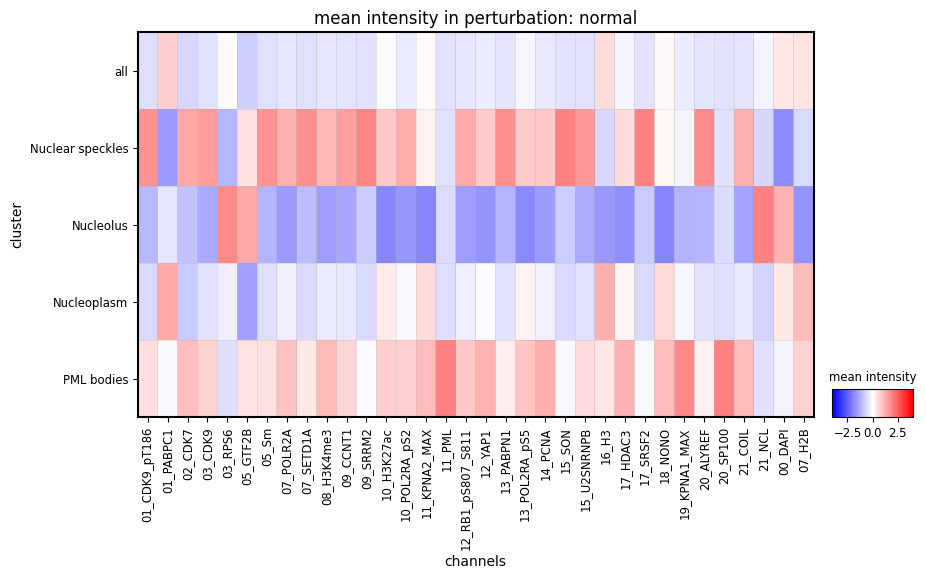
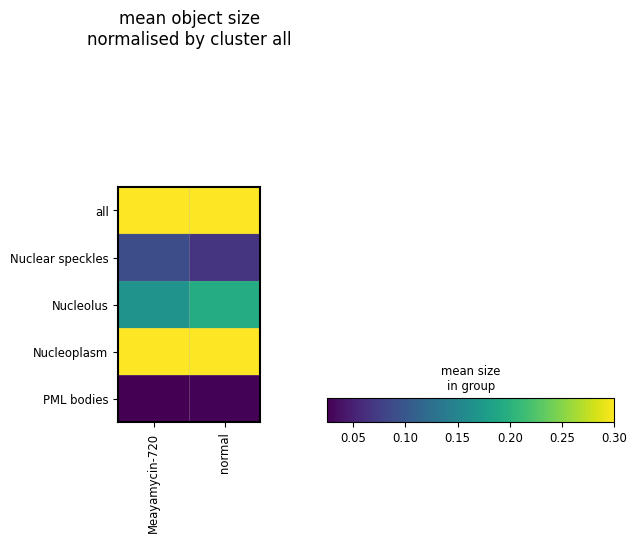
Using this combined adata, we can plot the mean intensity of each channel in each CSL and the size of each CSL in the unperturbed cells using plot_mean_intensity and plot_mean_size
[11]:
plot_mean_intensity(
    adata_intensity,
    groupby="cluster",
    limit_to_groups={"perturbation": "normal"},
    dendrogram=False,
    layer=None,
    standard_scale="var",
    cmap="bwr",
    vmin=-4,
    vmax=4,
)
plot_mean_size(
    adata_intensity,
    groupby_row="cluster",
    groupby_col="perturbation_duration",
    normby_row="all",
    vmax=0.3,
)
/home/icb/hannah.spitzer/projects/pelkmans/software_new/campa/campa/pl/_intensity_features.py:222: FutureWarning: The default value of numeric_only in DataFrameGroupBy.mean is deprecated. In a future version, numeric_only will default to False. Either specify numeric_only or select only columns which should be valid for the function.
  c: adata[adata.obs[groupby_col] == c].obs.groupby(groupby_row).mean()["size"]
/home/icb/hannah.spitzer/projects/pelkmans/software_new/campa/campa/pl/_intensity_features.py:222: FutureWarning: The default value of numeric_only in DataFrameGroupBy.mean is deprecated. In a future version, numeric_only will default to False. Either specify numeric_only or select only columns which should be valid for the function.
  c: adata[adata.obs[groupby_col] == c].obs.groupby(groupby_row).mean()["size"]
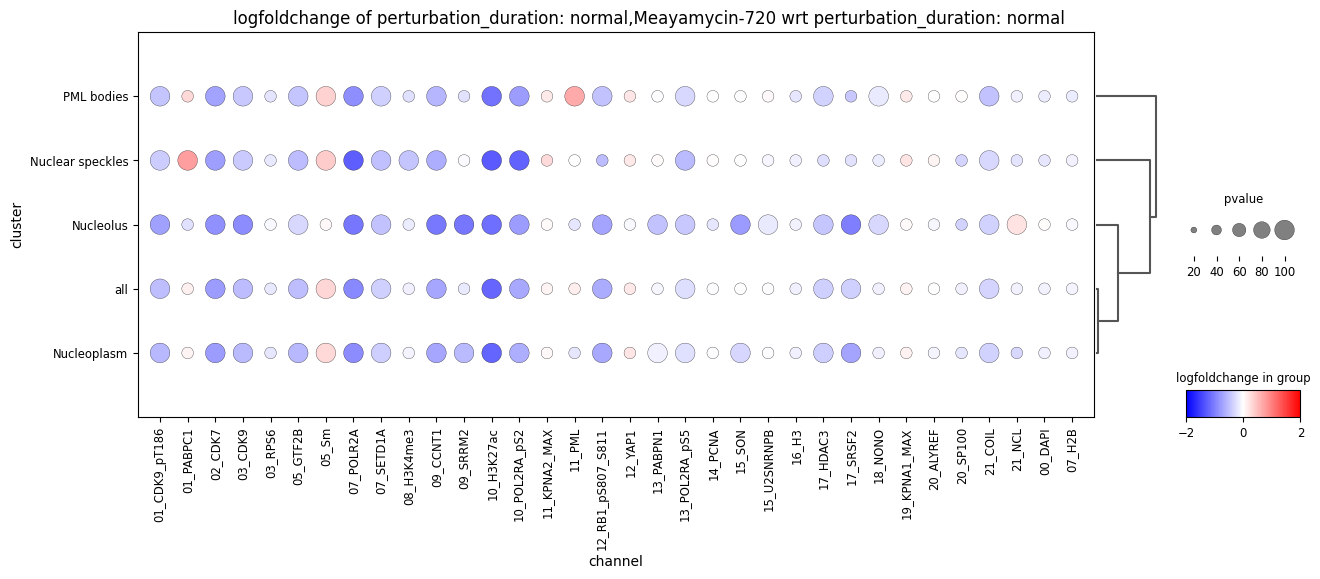
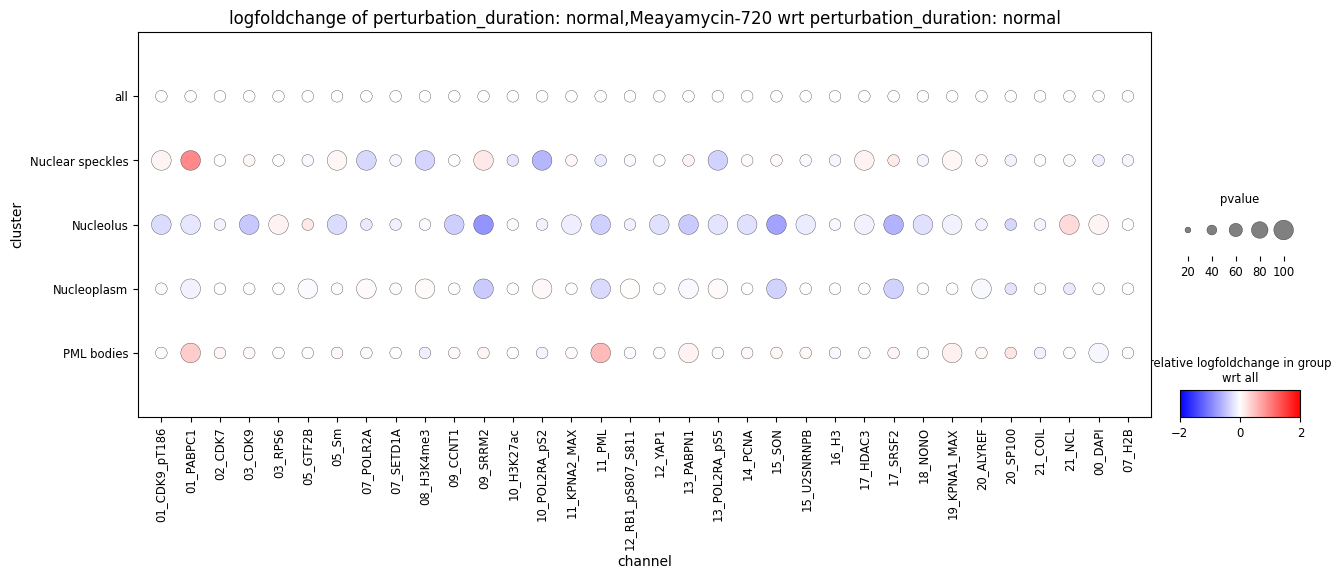
Now, let us visualise the log2fold change in intensity in the Meayamycin perturbation compared to unperturbed cells with plot_intensity_change. This plots a dot plot of clusters by channels. The colour of each dot is the log2fold change in intensity compared to unperturbed cells. The size of the dots indicated the p-value. Small dots are non-significant intensity changes, large dots are significant (p > alpha). For the sake of speed, here,
p-values are determined using a t-test, for more accurate p-values, please use pval='mixed_model', which will include well as random effect.
The first plot shows the log2fold change, and the second plot the relative log2fold change per CSL, obtained by dividing the values by the “all” column (norm_by_group='all')
[12]:
res = get_intensity_change(
    adata_intensity,
    groupby="cluster",
    reference_group="perturbation_duration",
    reference=["normal"],
    limit_to_groups={"perturbation_duration": ["normal", "Meayamycin-720"]},
    color="logfoldchange",
    size="pval",
    pval="ttest",
)
plot_intensity_change(**res, adjust_height=True, figsize=(15, 5), vmin=-2, vmax=2, dendrogram=True)

res = get_intensity_change(
    adata_intensity,
    groupby="cluster",
    reference_group="perturbation_duration",
    reference=["normal"],
    limit_to_groups={"perturbation_duration": ["normal", "Meayamycin-720"]},
    color="logfoldchange",
    size="pval",
    pval="ttest",
    norm_by_group="all",
)
plot_intensity_change(**res, adjust_height=True, figsize=(15, 5), vmin=-2, vmax=2)
WARNING: dendrogram data not found (using key=dendrogram_cluster). Running `sc.tl.dendrogram` with default parameters. For fine tuning it is recommended to run `sc.tl.dendrogram` independently.
/home/icb/hannah.spitzer/miniconda3/envs/campa/lib/python3.9/site-packages/scanpy/plotting/_dotplot.py:749: UserWarning: No data for colormapping provided via 'c'. Parameters 'cmap', 'norm' will be ignored
  dot_ax.scatter(x, y, **kwds)
/home/icb/hannah.spitzer/projects/pelkmans/software_new/campa/campa/pl/_intensity_features.py:459: RuntimeWarning: Precision loss occurred in moment calculation due to catastrophic cancellation. This occurs when the data are nearly identical. Results may be unreliable.
  _, pvals = scipy.stats.ttest_ind(cur_ref_expr, g_expr, axis=0)
/home/icb/hannah.spitzer/miniconda3/envs/campa/lib/python3.9/site-packages/scanpy/plotting/_dotplot.py:749: UserWarning: No data for colormapping provided via 'c'. Parameters 'cmap', 'norm' will be ignored
  dot_ax.scatter(x, y, **kwds)
Co-occurrence scores
Co-occurrence scores are calculated for each cluster-cluster pair. They are stored in adata.obsm['co_occurrence_{cluster1}_{cluster2}'] as a n cells x distances matrix. The distances used can be found in adata.uns['co_occurrence_params'].
[13]:
extr = extrs[0]
display(extr.adata.obsm["co_occurrence_Nucleolus_Nuclear speckles"])

print(extr.adata.uns["co_occurrence_params"])
| 0 | 1 | 2 | 3 | |
|---|---|---|---|---|
| 0 | 0.020466 | 0.129805 | 0.733902 | 1.106458 |
| 1 | 0.118672 | 0.361029 | 0.867357 | 1.069965 |
| 2 | 0.062864 | 0.266752 | 0.787869 | 1.159926 |
| 3 | 0.035031 | 0.120766 | 0.550169 | 1.213713 |
| 4 | 0.000458 | 0.060348 | 0.623832 | 1.188438 |
| 5 | 0.000000 | 0.000000 | 0.129918 | 1.871468 |
| 6 | 0.043499 | 0.271834 | 0.901377 | 1.108016 |
| 7 | 0.042482 | 0.246719 | 0.788401 | 1.192697 |
| 8 | 0.000000 | 0.000000 | 0.000000 | 0.000000 |
| 9 | 0.011935 | 0.181210 | 1.058228 | 1.093186 |
| 10 | 0.114000 | 0.454269 | 0.865092 | 1.167536 |
| 11 | 0.019074 | 0.189035 | 0.644840 | 1.052670 |
{'interval': array([ 2.       ,  4.6806946, 10.954452 , 25.63722  , 60.       ],
      dtype=float32)}
It is possible to export the co-occurrence information in one csv file for each CSL-CSL pair using [FeatureExtractor.extract_co_occurrence_csv][]. The resulting csv file contains the co-occurrence scores for each distance interval as columns and cells as rows, as well as additionally defined columns. This saves one csv file per CSL-CSL pair in experiment_dir/aggregated/full_data/data_dir/export.
[14]:
for extr in extrs:
    extr.extract_co_occurrence_csv(obs=["well_name", "perturbation_duration", "TR"])
[15]:
extr = extrs[0]
# check if results are stored
save_dir = os.path.join(os.path.dirname(extr.fname), "export")
print("csv exported to", save_dir)
print([n for n in os.listdir(save_dir) if "co_occurrence" in n])

display(pd.read_csv(os.path.join(save_dir, "co_occurrence_Nucleoplasm_Nucleolus_features_annotation.csv"), index_col=0))
csv exported to /home/icb/hannah.spitzer/projects/pelkmans/software_new/campa_notebooks_test/example_experiments/test_pre_trained/CondVAE_pert-CC/aggregated/full_data/184A1_unperturbed/I09/export
['co_occurrence_PML bodies_Nuclear speckles_features_annotation.csv', 'co_occurrence_Nucleoplasm_Nuclear speckles_features_annotation.csv', 'co_occurrence_Nucleoplasm_Nucleolus_features_annotation.csv', 'co_occurrence_Nucleolus_PML bodies_features_annotation.csv', 'co_occurrence_Nuclear speckles_Nuclear speckles_features_annotation.csv', 'co_occurrence_PML bodies_Nucleolus_features_annotation.csv', 'co_occurrence_PML bodies_Nucleoplasm_features_annotation.csv', 'co_occurrence_Nucleolus_Nucleolus_features_annotation.csv', 'co_occurrence_Nuclear speckles_PML bodies_features_annotation.csv', 'co_occurrence_PML bodies_PML bodies_features_annotation.csv', 'co_occurrence_Nucleoplasm_PML bodies_features_annotation.csv', 'co_occurrence_Nuclear speckles_Nucleoplasm_features_annotation.csv', 'co_occurrence_Nucleolus_Nucleoplasm_features_annotation.csv', 'co_occurrence_Nuclear speckles_Nucleolus_features_annotation.csv', 'co_occurrence_Nucleolus_Nuclear speckles_features_annotation.csv', 'co_occurrence_Nucleoplasm_Nucleoplasm_features_annotation.csv']
| 2.00-4.68 | 4.68-10.95 | 10.95-25.64 | 25.64-60.00 | mapobject_id | well_name | perturbation_duration | TR | |
|---|---|---|---|---|---|---|---|---|
| 0 | 0.217142 | 0.451038 | 0.831327 | 1.048945 | 205776 | I09 | normal | 357.672008 |
| 1 | 0.185153 | 0.335840 | 0.631343 | 1.033807 | 205790 | I09 | normal | 428.364268 |
| 2 | 0.217809 | 0.353777 | 0.604462 | 1.113828 | 248082 | I09 | normal | 250.488581 |
| 3 | 0.247925 | 0.441065 | 0.739990 | 1.001092 | 248102 | I09 | normal | 515.735421 |
| 4 | 0.161814 | 0.340358 | 0.684436 | 1.029913 | 259784 | I09 | normal | 348.150713 |
| 5 | 0.811214 | 1.009496 | 1.028775 | 0.992664 | 291041 | I09 | normal | 443.565445 |
| 6 | 0.217856 | 0.447180 | 0.789221 | 1.093390 | 345908 | I09 | normal | 316.004105 |
| 7 | 0.204482 | 0.405060 | 0.791247 | 1.076277 | 359378 | I09 | normal | 367.904255 |
| 8 | 0.545410 | 0.831929 | 1.024679 | 1.010255 | 359393 | I09 | normal | 513.668590 |
| 9 | 0.194497 | 0.413888 | 0.750494 | 1.032792 | 366493 | I09 | normal | 330.847832 |
| 10 | 0.236510 | 0.432413 | 0.801058 | 1.047899 | 383341 | I09 | normal | 388.012319 |
| 11 | 0.183172 | 0.370742 | 0.700137 | 1.014940 | 383793 | I09 | normal | 376.243596 |
We can plot co-occurrence scores by using plot_co_occurrence or plot_co_occurrence_grid. First, we need to combine all adata objects into one. For this, we can use AnnData.concat.
[16]:
# get combined adata
adata_co_occ = ad.concat([extr.adata for extr in extrs], index_unique="-", uns_merge="same")

print("co-occurrence scores:", adata_co_occ.obsm)
co-occurrence scores: AxisArrays with keys: co_occurrence_Nuclear speckles_Nuclear speckles, co_occurrence_Nuclear speckles_Nucleolus, co_occurrence_Nuclear speckles_Nucleoplasm, co_occurrence_Nuclear speckles_PML bodies, co_occurrence_Nucleolus_Nuclear speckles, co_occurrence_Nucleolus_Nucleolus, co_occurrence_Nucleolus_Nucleoplasm, co_occurrence_Nucleolus_PML bodies, co_occurrence_Nucleoplasm_Nuclear speckles, co_occurrence_Nucleoplasm_Nucleolus, co_occurrence_Nucleoplasm_Nucleoplasm, co_occurrence_Nucleoplasm_PML bodies, co_occurrence_PML bodies_Nuclear speckles, co_occurrence_PML bodies_Nucleolus, co_occurrence_PML bodies_Nucleoplasm, co_occurrence_PML bodies_PML bodies, size
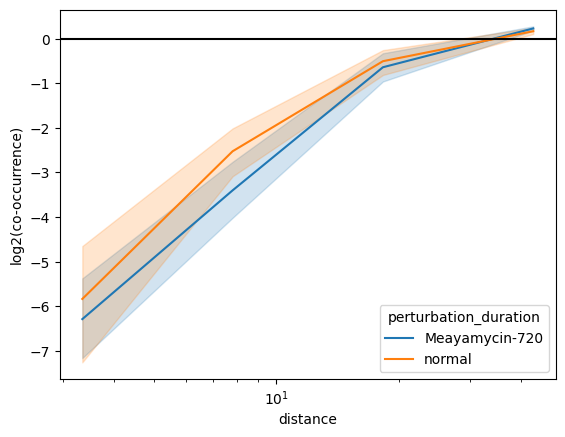
With plot_co_occurrence we can plot one cluster-cluster pair. With condition we can define the grouping of scores. Each group will be displayed by a separate line on the co-occurrence plot.
The co-occurrence plot shows the calculated co-occurrence scores for each distance interval. Here, we show the mean co-occurrence values and their 95th confidence interval obtained through bootstrapping.
[17]:
# plot meam co-occ scores
condition = "perturbation_duration"
condition_values = None

# for one cluster-cluster pairing
plot_co_occurrence(adata_co_occ, "Nucleolus", "Nuclear speckles", condition, condition_values, ci=95)
/home/icb/hannah.spitzer/projects/pelkmans/software_new/campa/campa/pl/_spatial_features.py:70: FutureWarning:

The `ci` parameter is deprecated. Use `errorbar=('ci', 95)` for the same effect.

  g = sns.lineplot(data=scores, y="score", x="distance", hue=condition, ax=ax, **kwargs)
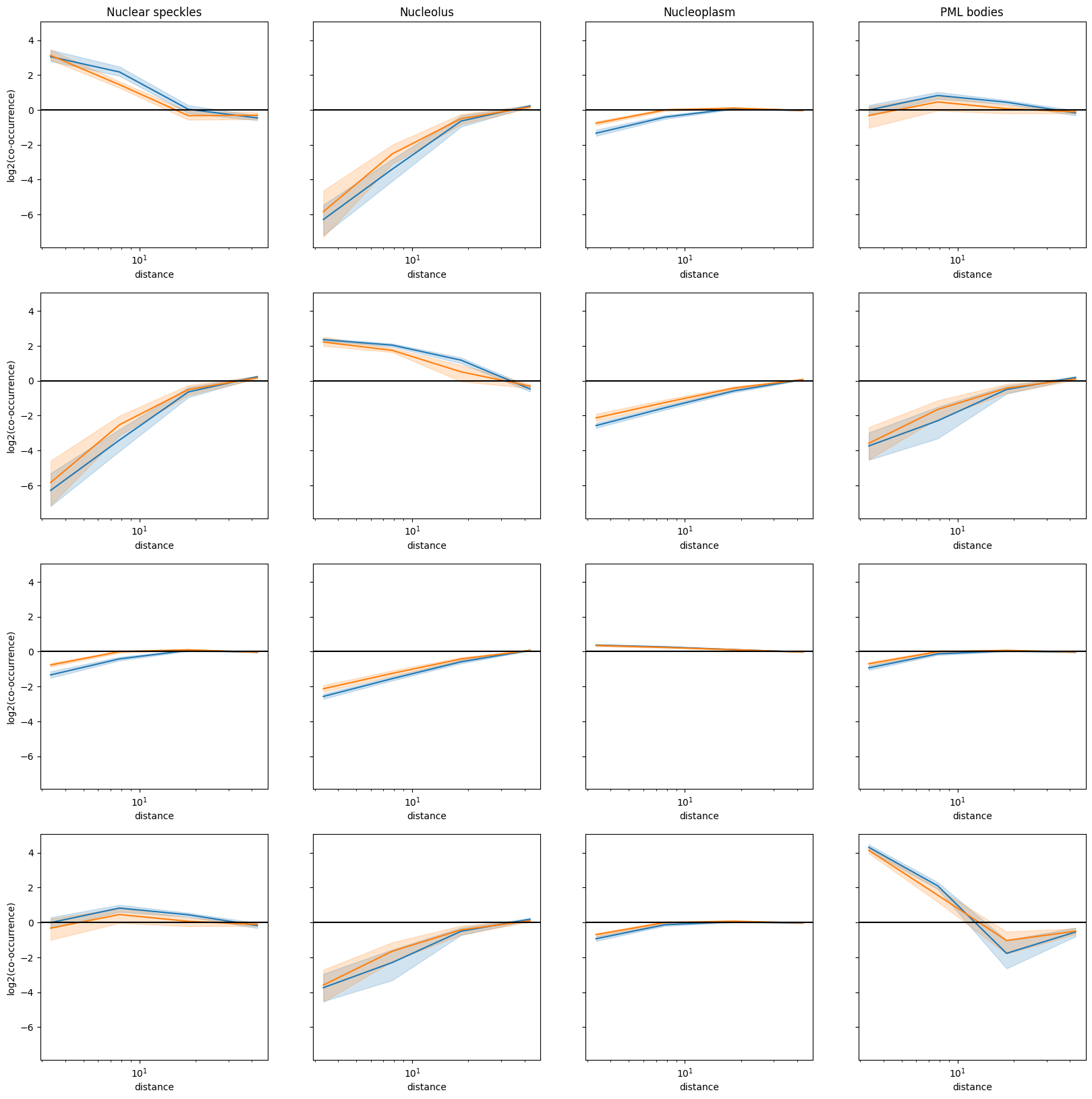
With plot_co_occurrence_grid we can plot an overview of all cluster-cluster pairs.
[18]:
fig, axes = plot_co_occurrence_grid(adata_co_occ, condition, condition_values, legend=False, ci=95, figsize=(20, 20))
/home/icb/hannah.spitzer/projects/pelkmans/software_new/campa/campa/pl/_spatial_features.py:70: FutureWarning:

The `ci` parameter is deprecated. Use `errorbar=('ci', 95)` for the same effect.

  g = sns.lineplot(data=scores, y="score", x="distance", hue=condition, ax=ax, **kwargs)
/home/icb/hannah.spitzer/projects/pelkmans/software_new/campa/campa/pl/_spatial_features.py:70: FutureWarning:

The `ci` parameter is deprecated. Use `errorbar=('ci', 95)` for the same effect.

  g = sns.lineplot(data=scores, y="score", x="distance", hue=condition, ax=ax, **kwargs)
/home/icb/hannah.spitzer/projects/pelkmans/software_new/campa/campa/pl/_spatial_features.py:70: FutureWarning:

The `ci` parameter is deprecated. Use `errorbar=('ci', 95)` for the same effect.

  g = sns.lineplot(data=scores, y="score", x="distance", hue=condition, ax=ax, **kwargs)
/home/icb/hannah.spitzer/projects/pelkmans/software_new/campa/campa/pl/_spatial_features.py:70: FutureWarning:

The `ci` parameter is deprecated. Use `errorbar=('ci', 95)` for the same effect.

  g = sns.lineplot(data=scores, y="score", x="distance", hue=condition, ax=ax, **kwargs)
/home/icb/hannah.spitzer/projects/pelkmans/software_new/campa/campa/pl/_spatial_features.py:70: FutureWarning:

The `ci` parameter is deprecated. Use `errorbar=('ci', 95)` for the same effect.

  g = sns.lineplot(data=scores, y="score", x="distance", hue=condition, ax=ax, **kwargs)
/home/icb/hannah.spitzer/projects/pelkmans/software_new/campa/campa/pl/_spatial_features.py:70: FutureWarning:

The `ci` parameter is deprecated. Use `errorbar=('ci', 95)` for the same effect.

  g = sns.lineplot(data=scores, y="score", x="distance", hue=condition, ax=ax, **kwargs)
/home/icb/hannah.spitzer/projects/pelkmans/software_new/campa/campa/pl/_spatial_features.py:70: FutureWarning:

The `ci` parameter is deprecated. Use `errorbar=('ci', 95)` for the same effect.

  g = sns.lineplot(data=scores, y="score", x="distance", hue=condition, ax=ax, **kwargs)
/home/icb/hannah.spitzer/projects/pelkmans/software_new/campa/campa/pl/_spatial_features.py:70: FutureWarning:

The `ci` parameter is deprecated. Use `errorbar=('ci', 95)` for the same effect.

  g = sns.lineplot(data=scores, y="score", x="distance", hue=condition, ax=ax, **kwargs)
/home/icb/hannah.spitzer/projects/pelkmans/software_new/campa/campa/pl/_spatial_features.py:70: FutureWarning:

The `ci` parameter is deprecated. Use `errorbar=('ci', 95)` for the same effect.

  g = sns.lineplot(data=scores, y="score", x="distance", hue=condition, ax=ax, **kwargs)
/home/icb/hannah.spitzer/projects/pelkmans/software_new/campa/campa/pl/_spatial_features.py:70: FutureWarning:

The `ci` parameter is deprecated. Use `errorbar=('ci', 95)` for the same effect.

  g = sns.lineplot(data=scores, y="score", x="distance", hue=condition, ax=ax, **kwargs)
/home/icb/hannah.spitzer/projects/pelkmans/software_new/campa/campa/pl/_spatial_features.py:70: FutureWarning:

The `ci` parameter is deprecated. Use `errorbar=('ci', 95)` for the same effect.

  g = sns.lineplot(data=scores, y="score", x="distance", hue=condition, ax=ax, **kwargs)
/home/icb/hannah.spitzer/projects/pelkmans/software_new/campa/campa/pl/_spatial_features.py:70: FutureWarning:

The `ci` parameter is deprecated. Use `errorbar=('ci', 95)` for the same effect.

  g = sns.lineplot(data=scores, y="score", x="distance", hue=condition, ax=ax, **kwargs)
/home/icb/hannah.spitzer/projects/pelkmans/software_new/campa/campa/pl/_spatial_features.py:70: FutureWarning:

The `ci` parameter is deprecated. Use `errorbar=('ci', 95)` for the same effect.

  g = sns.lineplot(data=scores, y="score", x="distance", hue=condition, ax=ax, **kwargs)
/home/icb/hannah.spitzer/projects/pelkmans/software_new/campa/campa/pl/_spatial_features.py:70: FutureWarning:

The `ci` parameter is deprecated. Use `errorbar=('ci', 95)` for the same effect.

  g = sns.lineplot(data=scores, y="score", x="distance", hue=condition, ax=ax, **kwargs)
/home/icb/hannah.spitzer/projects/pelkmans/software_new/campa/campa/pl/_spatial_features.py:70: FutureWarning:

The `ci` parameter is deprecated. Use `errorbar=('ci', 95)` for the same effect.

  g = sns.lineplot(data=scores, y="score", x="distance", hue=condition, ax=ax, **kwargs)
/home/icb/hannah.spitzer/projects/pelkmans/software_new/campa/campa/pl/_spatial_features.py:70: FutureWarning:

The `ci` parameter is deprecated. Use `errorbar=('ci', 95)` for the same effect.

  g = sns.lineplot(data=scores, y="score", x="distance", hue=condition, ax=ax, **kwargs)
Object statistics
Object statistics are features extracted from connected components per cluster for each cell. Possible features are area, circlularity, elongation, and extent of connected components. Per component/region features are calculated and stored in adata.uns['object_stats'].
[19]:
display(extrs[0].adata.uns["object_stats"])
| area | circularity | elongation | extent | mapobject_id | clustering | |
|---|---|---|---|---|---|---|
| 0 | 9045 | 0.043528 | 0.227821 | 0.471585 | 205776 | Nucleoplasm |
| 1 | 978 | 0.638093 | 0.116856 | 0.735338 | 205776 | Nucleolus |
| 2 | 29 | 1.000000 | 0.096517 | 0.805556 | 205776 | Nucleolus |
| 3 | 256 | 0.541414 | 0.534975 | 0.561404 | 205776 | Nuclear speckles |
| 4 | 38 | 1.000000 | 0.321553 | 0.791667 | 205776 | PML bodies |
| ... | ... | ... | ... | ... | ... | ... |
| 346 | 98 | 0.810891 | 0.307977 | 0.753846 | 383793 | Nuclear speckles |
| 347 | 125 | 0.906486 | 0.290123 | 0.694444 | 383793 | Nuclear speckles |
| 348 | 14 | 1.000000 | 0.249786 | 0.700000 | 383793 | Nuclear speckles |
| 349 | 17 | 0.936106 | 0.524493 | 0.472222 | 383793 | PML bodies |
| 350 | 54 | 0.974758 | 0.269712 | 0.600000 | 383793 | PML bodies |
351 rows × 6 columns
To aggregate this information to per-cell level, FeatureExtractor.get_object_stats is used. This aggregated the data with the provided aggregation function and stores the result in adata.obsm['object_stats_agg']. In addition, we can filter small areas below area_threshold prior to aggregation.
[20]:
# aggregate object statistics using median
for extr in extrs:
    _ = extr.get_object_stats(area_threshold=10, agg=["median"])

# combined adatas for plotting
adata_object_stats = ad.concat([extr.adata for extr in extrs], index_unique="-", uns_merge="same")
adata_object_stats contains aggregated per cell object stats in obsm:
[21]:
adata_object_stats.obsm["object_stats_agg"]
[21]:
| area_median|Nuclear speckles | area_median|Nucleolus | area_median|Nucleoplasm | area_median|PML bodies | circularity_median|Nuclear speckles | circularity_median|Nucleolus | circularity_median|Nucleoplasm | circularity_median|PML bodies | elongation_median|Nuclear speckles | elongation_median|Nucleolus | elongation_median|Nucleoplasm | elongation_median|PML bodies | extent_median|Nuclear speckles | extent_median|Nucleolus | extent_median|Nucleoplasm | extent_median|PML bodies | count|Nuclear speckles | count|Nucleolus | count|Nucleoplasm | count|PML bodies | |
|---|---|---|---|---|---|---|---|---|---|---|---|---|---|---|---|---|---|---|---|---|
| 0-0 | 87.0 | 978.0 | 9045.0 | 42.5 | 0.861312 | 0.638093 | 0.043528 | 1.000000 | 0.285864 | 0.116856 | 0.227821 | 0.310047 | 0.633333 | 0.735338 | 0.471585 | 0.742063 | 11.0 | 3.0 | 1.0 | 6.0 |
| 1-0 | 97.5 | 438.0 | 9457.0 | 49.0 | 0.732411 | 0.411849 | 0.036234 | 0.959830 | 0.412936 | 0.337495 | 0.354512 | 0.253441 | 0.617695 | 0.551043 | 0.426221 | 0.711111 | 12.0 | 3.0 | 1.0 | 7.0 |
| 2-0 | 89.0 | 2365.0 | 4194.5 | 76.0 | 0.834565 | 0.131215 | 0.236317 | 0.957019 | 0.222408 | 0.349102 | 0.403929 | 0.199730 | 0.662551 | 0.532658 | 0.375361 | 0.714583 | 10.0 | 1.0 | 2.0 | 12.0 |
| 3-0 | 42.0 | 2593.0 | 13.0 | 36.0 | 0.863145 | 0.094925 | 1.000000 | 1.000000 | 0.355378 | 0.203823 | 0.307020 | 0.175429 | 0.607143 | 0.449004 | 0.501330 | 0.759736 | 9.0 | 1.0 | 3.0 | 12.0 |
| 4-0 | 72.0 | 1157.0 | 15376.0 | 57.0 | 0.905092 | 0.381709 | 0.040231 | 1.000000 | 0.381959 | 0.233705 | 0.330665 | 0.175379 | 0.610185 | 0.600415 | 0.513355 | 0.777778 | 16.0 | 3.0 | 1.0 | 9.0 |
| 5-0 | 32.0 | 18.0 | 6580.0 | 97.5 | 1.000000 | 1.000000 | 0.297695 | 0.858740 | 0.068028 | 0.226034 | 0.343594 | 0.125506 | 0.761905 | 0.666667 | 0.679051 | 0.799632 | 1.0 | 2.0 | 1.0 | 2.0 |
| 6-0 | 66.0 | 959.0 | 7758.0 | 27.0 | 0.961701 | 0.432387 | 0.051205 | 1.000000 | 0.244032 | 0.460579 | 0.261960 | 0.190607 | 0.716852 | 0.549069 | 0.502331 | 0.771429 | 14.0 | 2.0 | 1.0 | 6.0 |
| 7-0 | 65.0 | 1055.5 | 7234.0 | 38.0 | 0.885201 | 0.598381 | 0.054602 | 1.000000 | 0.366449 | 0.562931 | 0.310322 | 0.117958 | 0.635417 | 0.445033 | 0.502780 | 0.727273 | 11.0 | 2.0 | 1.0 | 5.0 |
| 8-0 | 0.0 | 78.0 | 8453.0 | 82.5 | 0.000000 | 0.512022 | 0.147361 | 0.884891 | 0.000000 | 0.290167 | 0.271034 | 0.148813 | 0.000000 | 0.537500 | 0.635659 | 0.675196 | 0.0 | 3.0 | 1.0 | 2.0 |
| 9-0 | 72.0 | 1444.5 | 10587.0 | 63.0 | 0.853768 | 0.380567 | 0.052200 | 0.993804 | 0.405150 | 0.681782 | 0.234737 | 0.123254 | 0.600000 | 0.510217 | 0.542367 | 0.750000 | 11.0 | 2.0 | 1.0 | 5.0 |
| 10-0 | 39.0 | 1043.0 | 7398.0 | 58.5 | 0.932875 | 0.436683 | 0.048323 | 1.000000 | 0.388201 | 0.458571 | 0.185267 | 0.236344 | 0.571429 | 0.477905 | 0.556324 | 0.738112 | 13.0 | 2.0 | 1.0 | 6.0 |
| 11-0 | 98.0 | 2805.0 | 8993.0 | 41.0 | 0.845314 | 0.239826 | 0.043590 | 0.988189 | 0.307977 | 0.211277 | 0.140934 | 0.336398 | 0.695378 | 0.572449 | 0.498062 | 0.696429 | 11.0 | 1.0 | 1.0 | 9.0 |
| 0-1 | 33.0 | 646.0 | 8387.0 | 90.0 | 0.984769 | 0.475397 | 0.056057 | 0.933442 | 0.402862 | 0.338597 | 0.085823 | 0.272680 | 0.565657 | 0.630244 | 0.541796 | 0.752778 | 7.0 | 3.0 | 1.0 | 2.0 |
| 1-1 | 40.0 | 4164.0 | 13403.0 | 41.0 | 1.000000 | 0.173680 | 0.036768 | 1.000000 | 0.376558 | 0.306077 | 0.159526 | 0.068881 | 0.641327 | 0.484186 | 0.510882 | 0.765152 | 20.0 | 1.0 | 1.0 | 10.0 |
| 2-1 | 88.0 | 1151.0 | 8304.0 | 23.0 | 0.742052 | 0.106195 | 0.064869 | 1.000000 | 0.315780 | 0.619785 | 0.103333 | 0.146457 | 0.599495 | 0.414924 | 0.572690 | 0.666667 | 8.0 | 1.0 | 1.0 | 9.0 |
| 3-1 | 64.0 | 2252.0 | 7856.0 | 43.0 | 0.857538 | 0.173152 | 0.059856 | 1.000000 | 0.267228 | 0.202500 | 0.245970 | 0.137212 | 0.653061 | 0.446825 | 0.508282 | 0.760000 | 9.0 | 1.0 | 1.0 | 7.0 |
| 4-1 | 91.0 | 2868.0 | 7387.0 | 51.0 | 0.756498 | 0.221948 | 0.035140 | 1.000000 | 0.312715 | 0.171164 | 0.349126 | 0.112509 | 0.606981 | 0.510684 | 0.467295 | 0.741667 | 10.0 | 1.0 | 1.0 | 6.0 |
| 5-1 | 31.0 | 1652.0 | 9770.0 | 47.0 | 0.689846 | 0.241960 | 0.050961 | 1.000000 | 0.211355 | 0.277617 | 0.288946 | 0.253809 | 0.574074 | 0.494759 | 0.549278 | 0.763788 | 5.0 | 1.0 | 1.0 | 6.0 |
| 6-1 | 57.0 | 873.0 | 22.0 | 27.0 | 0.863797 | 0.158189 | 0.751116 | 1.000000 | 0.337476 | 0.424378 | 0.370224 | 0.182968 | 0.631944 | 0.467984 | 0.418750 | 0.750000 | 9.0 | 2.0 | 4.0 | 8.0 |
| 7-1 | 54.0 | 659.0 | 6997.0 | 26.0 | 0.856820 | 0.465333 | 0.074767 | 1.000000 | 0.441801 | 0.482696 | 0.220509 | 0.162121 | 0.604167 | 0.591435 | 0.538396 | 0.722222 | 5.0 | 3.0 | 1.0 | 3.0 |
| 8-1 | 68.0 | 1110.5 | 8052.0 | 49.5 | 0.848859 | 0.808536 | 0.096679 | 1.000000 | 0.295531 | 0.124259 | 0.340513 | 0.243407 | 0.656250 | 0.757819 | 0.515559 | 0.756818 | 5.0 | 2.0 | 1.0 | 6.0 |
| 9-1 | 126.0 | 584.0 | 5990.0 | 57.5 | 0.752271 | 0.233462 | 0.068063 | 1.000000 | 0.353340 | 0.384750 | 0.112466 | 0.169162 | 0.641026 | 0.565739 | 0.548836 | 0.692956 | 5.0 | 2.0 | 1.0 | 4.0 |
| 10-1 | 77.5 | 48.0 | 12283.0 | 58.0 | 0.832699 | 0.389967 | 0.035018 | 1.000000 | 0.331494 | 0.679027 | 0.271263 | 0.087320 | 0.600069 | 0.325420 | 0.515464 | 0.714286 | 10.0 | 6.0 | 1.0 | 9.0 |
| 11-1 | 24.0 | 1602.0 | 12253.0 | 36.5 | 0.871560 | 0.371284 | 0.063537 | 1.000000 | 0.317529 | 0.486609 | 0.322754 | 0.254069 | 0.510204 | 0.526215 | 0.580024 | 0.722222 | 7.0 | 2.0 | 1.0 | 8.0 |
| 12-1 | 82.0 | 2723.0 | 8338.0 | 60.0 | 0.901766 | 0.418904 | 0.058905 | 1.000000 | 0.311033 | 0.392981 | 0.317050 | 0.219982 | 0.656250 | 0.702528 | 0.486891 | 0.732143 | 9.0 | 1.0 | 1.0 | 7.0 |
| 13-1 | 59.0 | 3417.0 | 10921.0 | 39.5 | 0.875924 | 0.156722 | 0.046924 | 1.000000 | 0.284057 | 0.460068 | 0.246043 | 0.162387 | 0.589927 | 0.483173 | 0.512867 | 0.755102 | 12.0 | 1.0 | 1.0 | 4.0 |
| 0-2 | 81.0 | 506.0 | 6095.0 | 59.5 | 0.874082 | 0.692071 | 0.061450 | 0.813102 | 0.271903 | 0.204649 | 0.566809 | 0.318936 | 0.640152 | 0.709939 | 0.376095 | 0.680556 | 6.0 | 3.0 | 1.0 | 2.0 |
| 1-2 | 112.0 | 1028.0 | 18268.0 | 47.0 | 0.684060 | 0.651009 | 0.057497 | 1.000000 | 0.461039 | 0.224796 | 0.272422 | 0.176686 | 0.534722 | 0.668787 | 0.555934 | 0.750000 | 9.0 | 3.0 | 1.0 | 11.0 |
| 2-2 | 158.0 | 2256.0 | 11749.0 | 58.0 | 0.772462 | 0.298946 | 0.072532 | 1.000000 | 0.262487 | 0.553125 | 0.176129 | 0.160893 | 0.670455 | 0.502674 | 0.568821 | 0.805556 | 7.0 | 1.0 | 1.0 | 7.0 |
| 3-2 | 231.5 | 2455.0 | 9577.0 | 50.0 | 0.704407 | 0.394730 | 0.070778 | 1.000000 | 0.377610 | 0.272570 | 0.451540 | 0.159108 | 0.657225 | 0.631430 | 0.454878 | 0.691358 | 6.0 | 1.0 | 1.0 | 5.0 |
| 4-2 | 151.0 | 3289.0 | 11322.0 | 40.0 | 0.767014 | 0.349287 | 0.048491 | 1.000000 | 0.311007 | 0.651149 | 0.319685 | 0.172907 | 0.633250 | 0.413399 | 0.471691 | 0.714286 | 12.0 | 1.0 | 1.0 | 7.0 |
| 5-2 | 205.5 | 16.0 | 11118.0 | 21.0 | 0.662480 | 1.000000 | 0.086700 | 1.000000 | 0.447544 | 0.193111 | 0.178973 | 0.181705 | 0.624603 | 0.601638 | 0.580514 | 0.718182 | 4.0 | 3.0 | 1.0 | 14.0 |
| 6-2 | 39.0 | 4629.0 | 18873.0 | 66.0 | 0.882109 | 0.277760 | 0.062439 | 1.000000 | 0.279717 | 0.502306 | 0.069330 | 0.102909 | 0.638826 | 0.495345 | 0.577209 | 0.738905 | 8.0 | 1.0 | 1.0 | 8.0 |
| 7-2 | 424.5 | 937.5 | 10973.0 | 73.5 | 0.552564 | 0.664226 | 0.079359 | 0.957464 | 0.440302 | 0.258909 | 0.249811 | 0.271398 | 0.596174 | 0.643831 | 0.513910 | 0.668182 | 4.0 | 2.0 | 1.0 | 8.0 |
| 8-2 | 86.0 | 1448.0 | 12608.0 | 80.0 | 0.748017 | 0.390063 | 0.051236 | 0.974549 | 0.345564 | 0.475289 | 0.208464 | 0.180974 | 0.547619 | 0.588658 | 0.555125 | 0.688312 | 11.0 | 2.0 | 1.0 | 5.0 |
| 9-2 | 109.0 | 2110.0 | 8335.0 | 47.0 | 0.819828 | 0.562741 | 0.081130 | 0.950839 | 0.330001 | 0.478976 | 0.084208 | 0.354715 | 0.644192 | 0.793233 | 0.521851 | 0.679457 | 6.0 | 1.0 | 1.0 | 4.0 |
| 10-2 | 76.0 | 2238.0 | 12062.0 | 37.0 | 0.715299 | 0.618056 | 0.077079 | 1.000000 | 0.481178 | 0.283293 | 0.247034 | 0.130520 | 0.633971 | 0.744016 | 0.574709 | 0.750000 | 8.0 | 1.0 | 1.0 | 9.0 |
| 0-3 | 26.0 | 38.5 | 10357.0 | 70.5 | 0.715492 | 0.848255 | 0.073592 | 0.955768 | 0.555150 | 0.312634 | 0.151869 | 0.268488 | 0.496795 | 0.592727 | 0.543047 | 0.671364 | 7.0 | 4.0 | 1.0 | 6.0 |
| 1-3 | 159.0 | 1142.0 | 8944.0 | 76.0 | 0.823861 | 0.261123 | 0.058375 | 0.995851 | 0.194221 | 0.462433 | 0.130762 | 0.143551 | 0.672059 | 0.454495 | 0.507951 | 0.773810 | 8.0 | 2.0 | 1.0 | 5.0 |
| 2-3 | 193.0 | 450.0 | 9745.0 | 34.0 | 0.802449 | 0.489826 | 0.052970 | 0.995891 | 0.389129 | 0.206004 | 0.216125 | 0.355088 | 0.642857 | 0.573980 | 0.541389 | 0.686012 | 7.0 | 3.0 | 1.0 | 8.0 |
| 3-3 | 130.0 | 780.0 | 15704.0 | 66.0 | 0.617096 | 0.618706 | 0.038042 | 0.990273 | 0.371340 | 0.227953 | 0.140536 | 0.143821 | 0.669643 | 0.633333 | 0.523991 | 0.686065 | 11.0 | 5.0 | 1.0 | 10.0 |
| 4-3 | 0.0 | 177.0 | 12530.0 | 25.5 | 0.000000 | 0.588240 | 0.092439 | 1.000000 | 0.000000 | 0.315782 | 0.190005 | 0.255248 | 0.000000 | 0.650735 | 0.617972 | 0.600446 | 0.0 | 3.0 | 1.0 | 6.0 |
| 5-3 | 115.5 | 726.0 | 12691.0 | 78.0 | 0.813633 | 0.541090 | 0.056721 | 0.915472 | 0.306740 | 0.242757 | 0.298018 | 0.127670 | 0.662764 | 0.583153 | 0.511322 | 0.702040 | 10.0 | 4.0 | 1.0 | 6.0 |
| 6-3 | 337.0 | 1795.0 | 12922.0 | 75.0 | 0.605931 | 0.522038 | 0.058115 | 0.946450 | 0.430918 | 0.306800 | 0.101516 | 0.095062 | 0.540936 | 0.620238 | 0.524432 | 0.705128 | 5.0 | 2.0 | 1.0 | 11.0 |
| 7-3 | 164.0 | 1272.5 | 18073.0 | 47.0 | 0.685409 | 0.676682 | 0.042065 | 1.000000 | 0.373616 | 0.197385 | 0.228095 | 0.141581 | 0.622322 | 0.655476 | 0.515988 | 0.750000 | 12.0 | 4.0 | 1.0 | 9.0 |
| 8-3 | 154.5 | 3365.0 | 13819.0 | 52.0 | 0.788247 | 0.321839 | 0.062378 | 1.000000 | 0.260891 | 0.695200 | 0.194789 | 0.192065 | 0.697316 | 0.449866 | 0.532073 | 0.757716 | 8.0 | 1.0 | 1.0 | 6.0 |
It is possible to export the object stats in a csv file using FeatureExtractor.extract_object_stats_csv. The resulting csv file contains the aggregated object stats matrix from adata_object_stats.obsm['object_stats_agg'] as well as additionally defined columns. This saves one csv file per CSL-CSL pair in experiment_dir/aggregated/full_data/data_dir/export.
[22]:
for extr in extrs:
    extr.extract_object_stats_csv(obs=["well_name", "perturbation_duration", "TR"])
[23]:
extr = extrs[0]
# check if results are stored
save_dir = os.path.join(os.path.dirname(extr.fname), "export")
print("csv exported to", save_dir)
print([n for n in os.listdir(save_dir) if "object_stats" in n])
csv exported to /home/icb/hannah.spitzer/projects/pelkmans/software_new/campa_notebooks_test/example_experiments/test_pre_trained/CondVAE_pert-CC/aggregated/full_data/184A1_unperturbed/I09/export
['object_stats_features_annotation.csv']
plot_object_stats can be used to plot a box-plot overview of the object stats. Again, we can define the grouping using group_key.
[24]:
plot_object_stats(adata_object_stats, group_key="perturbation_duration", figsize_mult=(4, 4))
